The latest version of the AetherOnePi contains a processing application which allows you to collect hotbits (TRNG) directly from your webcam.
When you unzip the packages you will see a new processing folder. Inside there is a processing application which can be opened by doubleclicking if you have Processing installed.
When you start the program you will see a noisy image from your webcam. BUT PLEASE cover your camera opening in order to not to collect ordered structures. What we need is only a dark image where a lot of noise is visible.
noise from a covered webcam are the most random
When you press a key on your keyboard the application reacts with starting the collection process for the hotbits.
It will collect 20000 packages, enough for at least a month of analysis work. Some of the hotbits will be used for broadcasting too, as long as you have enough in your hotbits folder. When one package is consumed it will be deleted. This makes sure that you use only undeterminated random numbers (they stay in a quantum state until observed).
You can leave the application open until it reach 20.000 packages. Then it will show again the fuzzy noisy video. In the meantime you can open the AetherOnePi standalone Gui and work with the fresh hotbits for analysing.
The difference between an Arduino with one zener diode as a hotbits (TRNG in radionics) source and a webcam, is like a CPU and a GPU. A webcam has an image sensor with millions of little diodes instead of just one inside a Arduino analog sensor, or like just one inside a RaspberryPi.
The process of taking a photo with a CCD Sensor is achieved by a photon penetrating the silicon layer, which release electrons when they pass.
In the video “capacitive coupling” is mentioned, which is responsible for the “noise” in the image … and this is exactly what we are looking for, the big source for fresh hotbits, true randomness.
(Technically there are different reasons for the noise, some comes from the reading, others from the “shot” itself, and some are pure quantum phenomena.)
Naturally we don’t want a noise cancelling 😉
How to capture hotbits from a WebCam? When you call capture.loadPixels(); in Processing you get a array of pixels. My first approach was to read the first pixel in the array at position [0] and compare it to the next pixel of the array at [1] and so on. If the pixel value (a multiplication of the three colors red, green and blue) was bigger, I painted a black pixel and if smaller I painted a white pixel.
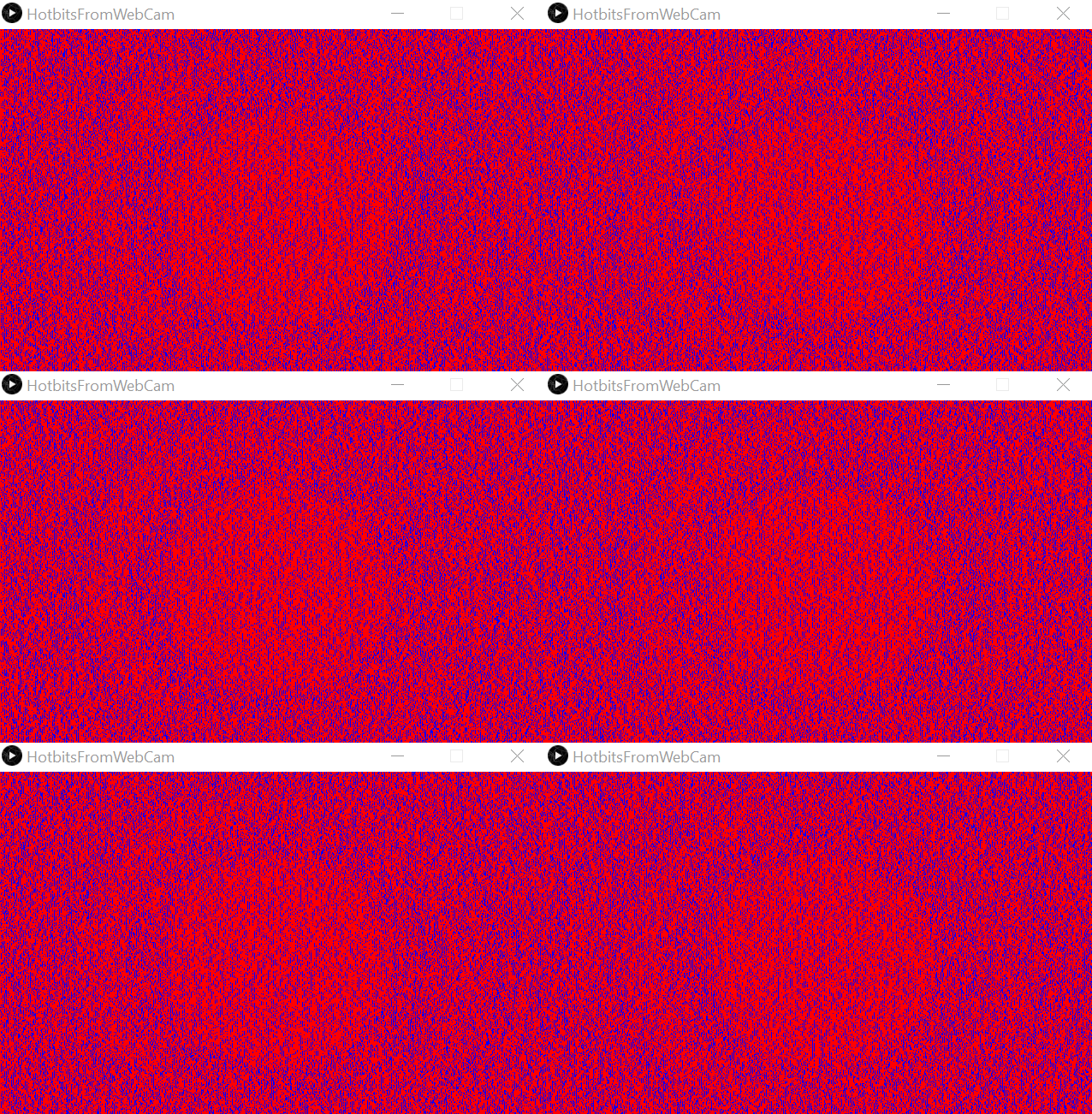
With a cover over the camera, which allows to receive only the “thermal noise”, I recorder a few seconds, but the result clearly shows an undesired pattern.
circle patterns = undesired order
import processing.video.*;

Capture capture;
int lastPixelColor = 0;

void setup() {
  size(640, 400);
  String[] cameras = Capture.list();
  printArray(cameras);
  capture = new Capture(this, cameras[8]);
  capture.start();
}

void captureEvent(Capture capture) {
  capture.read();
}

void draw() {
  capture.loadPixels();
  image(capture, 0, 0);

  loadPixels();

  for (int i = 0; i < width*height; i++) {

    color white = color(255, 0, 0);
    color black = color(0, 0, 255);
    int currentColor = pixels[i];

    if (currentColor > lastPixelColor) {
      pixels[i] = black;
    } else {
      pixels[i] = white;
    }

    lastPixelColor = currentColor;
  }

  updatePixels();
}
Clearly the pattern exist only from one pixel to another. But does it also exist from the same pixel to the next read cycle?
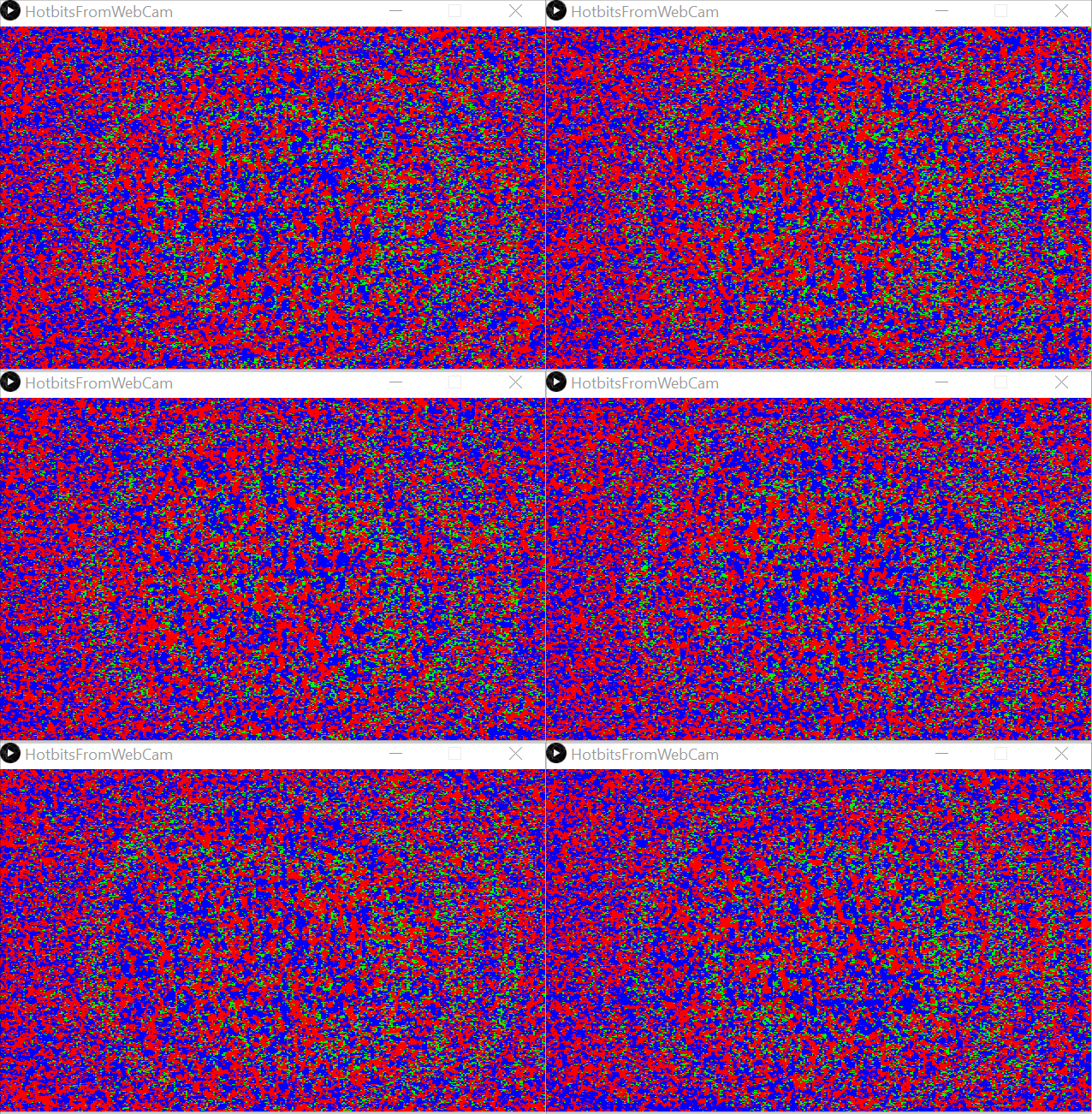
noise without patterns
The result is much better, a lot of noise, no patterns, but there are empty images inbetween. I should be able to get rid of them. (Actually, the empty images may be due double images from the driver, displayed when the CCD sensor was not ready for a new image).
Red and blue are useful noise, but the green is just a repeating pattern and therefore order. The red and blue pixels can be harnessed for the hotbits.
import processing.video.*;

Capture capture;
final int screen_width = 640;
final int screen_height = 400;
final int pixelArraySize = screen_width * screen_height;
Integer lastPixelArray [] = new Integer[pixelArraySize];

void setup() {
  size(640, 400);
  String[] cameras = Capture.list();
  printArray(cameras);
  capture = new Capture(this, cameras[8]);
  capture.start();
}

void captureEvent(Capture capture) {
  capture.read();
}

void draw() {

  boolean doubleImage = true;

  while (doubleImage) {

    capture.loadPixels();
    image(capture, 0, 0);
    loadPixels();

    int orderedPixels = 0;

    for (int i = 0; i < pixelArraySize; i++) {

      int currentColor = pixels[i];

      if (lastPixelArray[i] == null) {
        lastPixelArray[i] = currentColor;
      }

      color red = color(255, 0, 0);
      color green = color(0, 255, 0);
      color blue = color(0, 0, 255);
      int lastPixelColor = lastPixelArray[i];

      if (currentColor > lastPixelColor) {
        pixels[i] = blue;
      } else if (currentColor < lastPixelColor) {
        pixels[i] = red;
      } else {
        pixels[i] = green;
        orderedPixels++;
      }

      lastPixelArray[i] = currentColor;
    }

    if (orderedPixels < pixelArraySize / 3) {
      updatePixels();
      doubleImage = false;
    }
  }
}
Finally the single bits needs to be assembled to full integers and saved as JSON files for the AetherOnePi.
By the way, the hotter the WebCam, than more hotbits you get … (just place your hot cup of tea near the WebCam)
import processing.video.*;

final int HOW_MANY_FILES = 1000;
final int HOW_MANY_INTEGERS_PER_PACKAGES = 10000;

Capture capture;
final int screen_width = 640;
final int screen_height = 400;
final int pixelArraySize = screen_width * screen_height;
Integer lastPixelArray [] = new Integer[pixelArraySize];
String bits = "";
Integer countIntegers = 0;
Integer countPackages = 0;


void setup() {
  size(640, 400);
  String[] cameras = Capture.list();
  printArray(cameras);
  capture = new Capture(this, cameras[8]);
  capture.start();
  textSize(26);
}

void captureEvent(Capture capture) {
  capture.read();
}

void draw() {

  boolean doubleImage = true;
  int orderedPixels = 0;

  while (doubleImage) {

    capture.loadPixels();
    image(capture, 0, 0);
    loadPixels();

    orderedPixels = 0;

    for (int i = 0; i < pixelArraySize; i++) {

      int currentColor = pixels[i];

      if (lastPixelArray[i] == null) {
        lastPixelArray[i] = currentColor;
      }

      color red = color(255, 0, 0);
      color green = color(0, 255, 0);
      color blue = color(0, 0, 255);
      int lastPixelColor = lastPixelArray[i];

      if (currentColor > lastPixelColor) {
        pixels[i] = blue;
      } else if (currentColor < lastPixelColor) {
        pixels[i] = red;
      } else {
        pixels[i] = green;
        orderedPixels++;
      }

      lastPixelArray[i] = currentColor;
    }

    if (orderedPixels < pixelArraySize / 3) {
      updatePixels();
      doubleImage = false;
    }
  }

  // Harness the hotbits
  for (int i = 0; i < pixelArraySize; i++) {
    int currentColor = pixels[i];
    int lastPixelColor = lastPixelArray[i];

    if (currentColor > lastPixelColor) {
      bits += "1";
    } else if (currentColor < lastPixelColor) {
      bits += "0";
    }

    if (bits.length() >= 19) {
      Integer randomInt = Integer.parseInt(bits, 2);
      println(randomInt);
      bits = "";
      countIntegers ++;

      if (countIntegers >= HOW_MANY_INTEGERS_PER_PACKAGES) {
        countPackages++;
        countIntegers = 0;
      }
    }
  }

  fill(255);
  noStroke();
  rect(0, 0, 400, 100);
  fill(0);
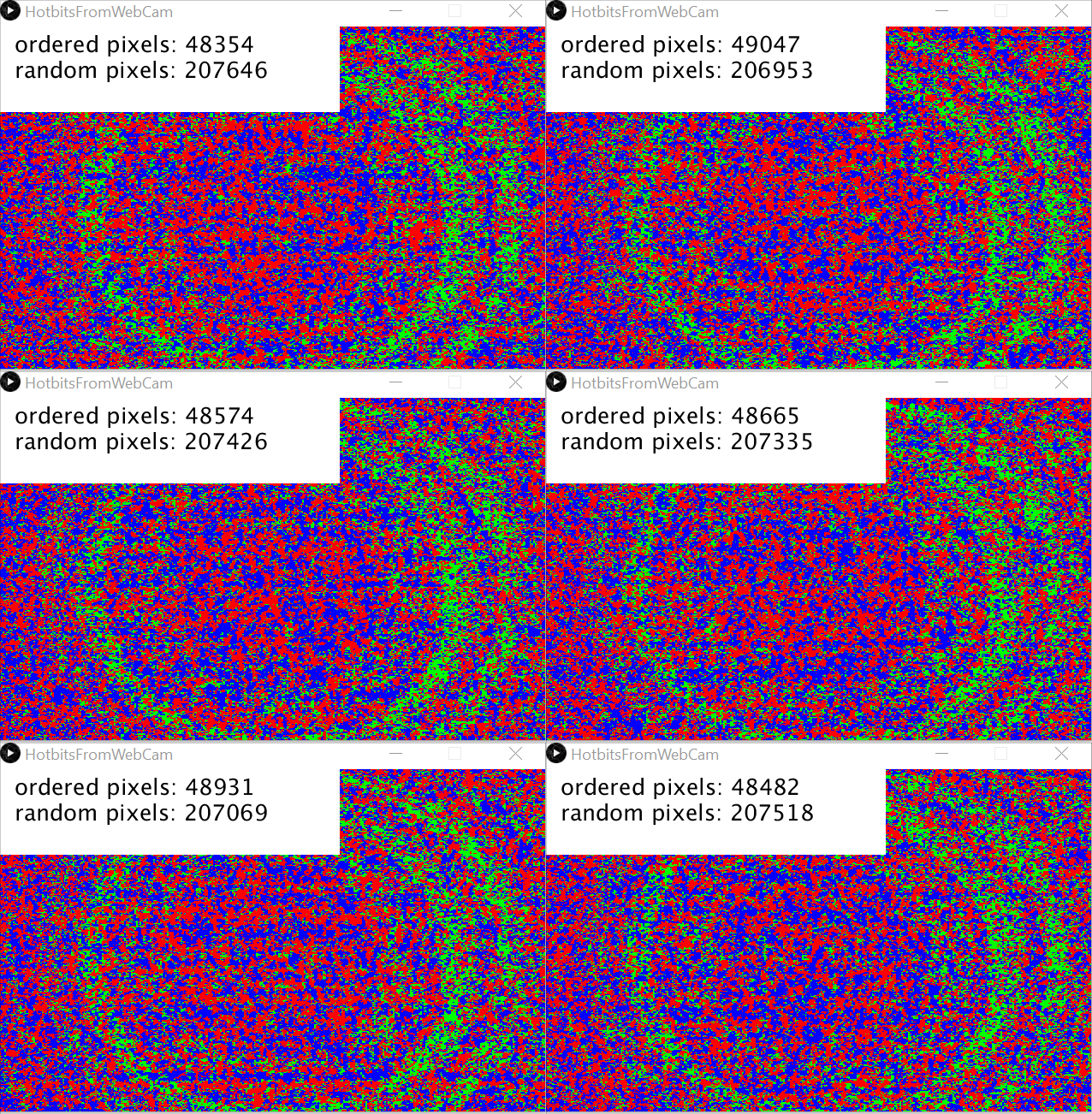
  text("ordered pixels: " + orderedPixels, 20, 30);
  text("random pixels: " + (pixelArraySize - orderedPixels), 20, 60);
  text("countPackages: " + countPackages, 20, 90);
}
I regard this as a proof of concept, good enough to implement it into the AetherOnePi project. It is super fast and you don’t need additional hardware. Indeed it is faster than a Arduino or RaspberryPi.
Main resonance is Crotalus Horridus. Possible causation according to the John Henry Clarke materia medica: Fright. Sun. Lightning. Alcohol. Foul water. Noxious effluvia.
I have read a lot of double blind studies for proving homeopathic remedies, but never one where the remedy was made with a radionics device. Joanna Lin published her paper with 150 pages detailed description, from her research till execution and analysis. She indeed proved that a remedy made with a Rae Potency Simulator is able to produce specific symptoms of Cantharis in test subjects. The experiment was conducted as a triple blind study.
I have seen this done with dowsing techniques and with radionics. The operator has a map and draws the outline of the area he wants to scan. Some use just a “quadrant”, then they don’t need to paint over the map. But we have today sophisticated software for free, like for example Google Maps or Google Earth, where you can draw custom maps.
Let me show you how I personally use Google Earth. Open the program and navigate to the place of interest. Zoom in on a level which permits you to see enough of the place. Select in the menu Tools and Lineal …
… then go into the tab “Polygon” and with your mouse draw a line around the island or city or street or whatever you want to scan … click finally on save.
A new dialog box appears (which is called “settings” or “properties” in english) and there you can set the name of the polygon and the color and style of the polygon. For example I like to choose a reddish color, set the style of the area to “filled” and a transparency of say 40%.
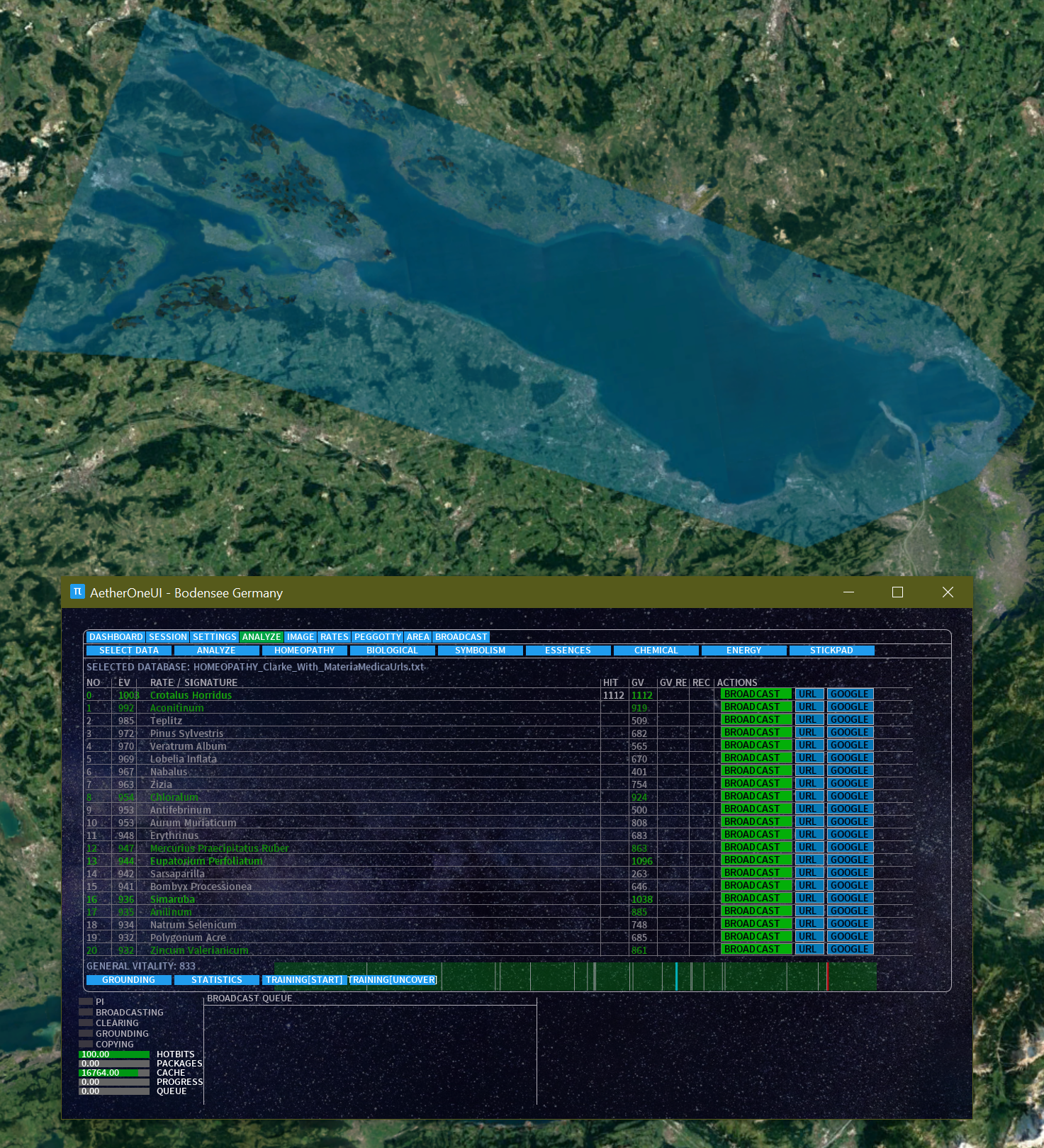
Finally I place the AetherOnePi Gui next to the area, formulate my intention in my mind and start analysis.
In this case I selected Mallorca, a island where people drinks a lot of soft drinks mixed with a lot of alcohol. Phosphoricum acidum is one of the prominent rates, which can be found in almost all soft drinks like cola. (The materia medica says … Causation.─Bad news. Grief. Chagrin. Disappointed love. Separation from home. Loss of fluids. Sexual excesses. Injuries. Operations. Over-lifting. Over-study. Shock. … and this island is best known for most of the clinical symptoms.)
Naturally it depends on your intention which level you try to scan. You can scan the past, the history of the island, or the current situation. Area scans was used in the past in agriculture, not only to get rid of parasites, but also to see which minerals the earth requires for specific plants.
Additionally you can write your notes into the description and by using HTML tags you can even insert links and images.
When you then click on the area your description appears.
By drag & drop you can move the newly created area description to a collection.
Today I was in the mood to scan big areas like entire countries or islands. Each area has some really interesting patterns, definitely they influence the people who live there.
Click on the image for a bigge size.
Sardinia
Sardinia is a island in the Mediterranean Sea and the second-largest island of Italy. Sardinia shares with the Japanese island of Okinawa the highest rate of centenarians in the world (22 centenarians/100,000 inhabitants). And the island has the most beautiful beaches in Europe.
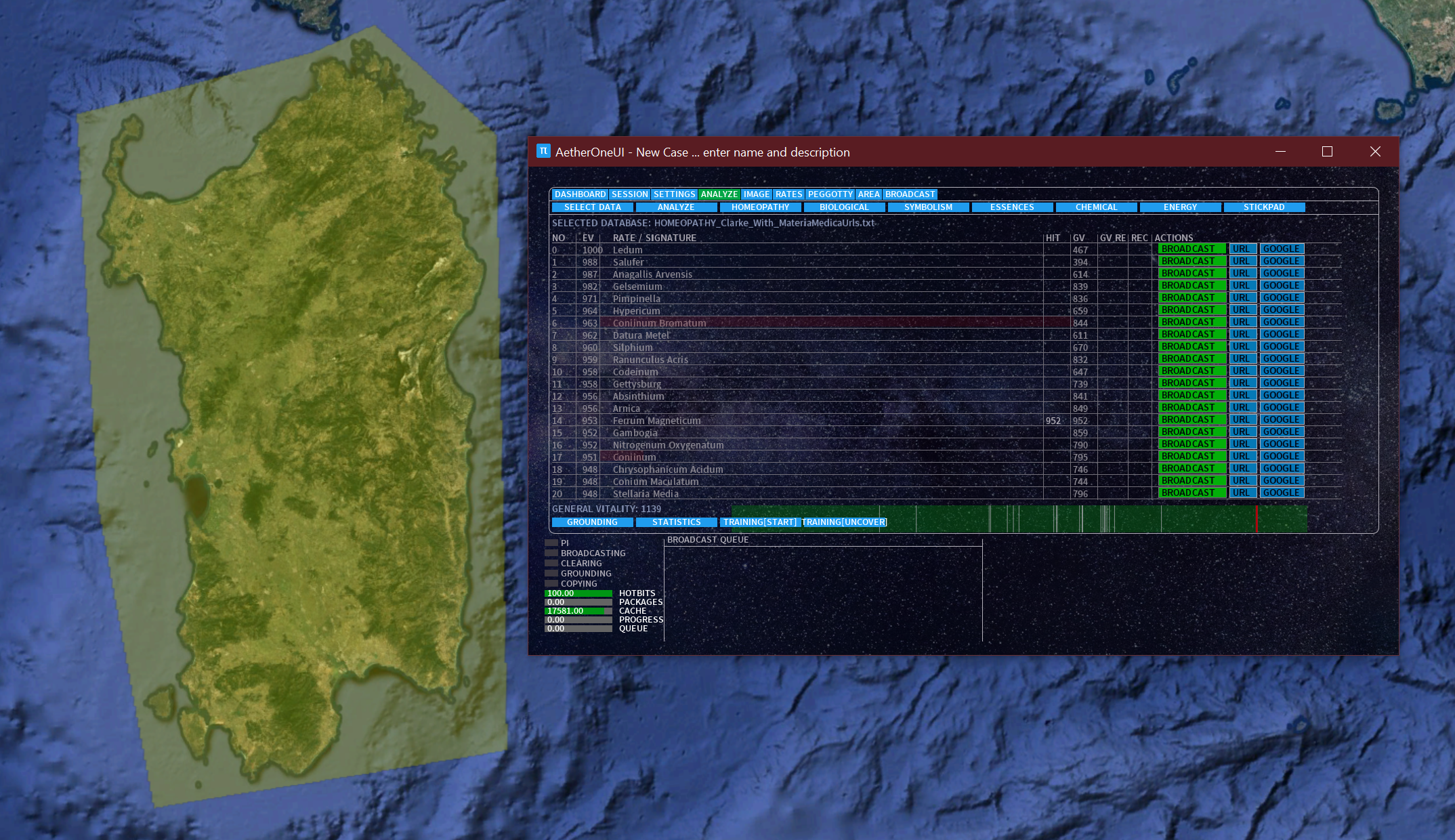
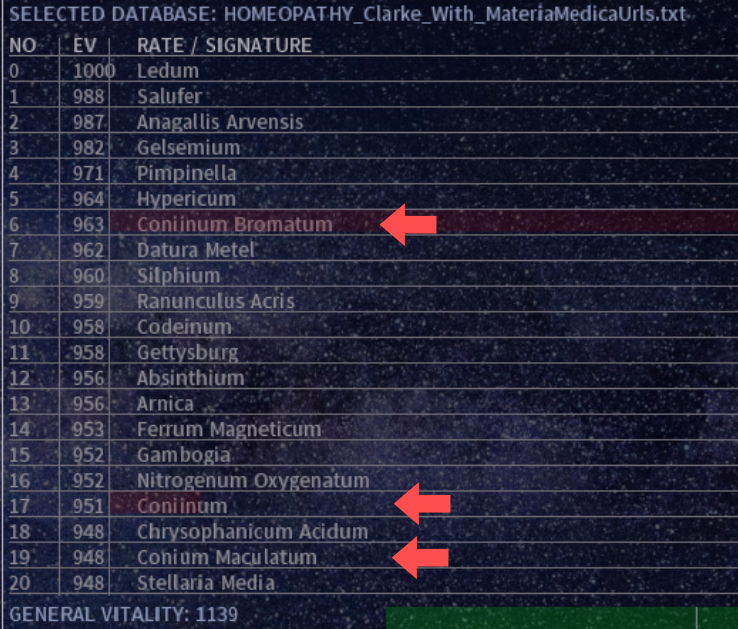
When I performed the scan the first thing was the remarkable high general vitality value of 1139. None of the rates in the list topped this value. The highest score has Ferrum Magneticum. Sardinia was a highly active volcanic zone and the rocks has a reddish color. The clinical symptoms of Ferrum Magneticum are Amaurosis. Diarrhœa. Flatulence. Ganglion. Rheumatism. Vision, disorders of. Warts. Whitlow. Alphonse Teste put Fer. magn. in the Arnica group along with Ledum, Croton, Rhus and Spig. (Clarke Materia Medica). What a coincidence, Ledum is on top of the result list. Both Ledum and Ferrum Magneticum are good for rheumatism. The rheumatism of Ledum is caused by alcoholism. It is said that the average Sardinian man drinks 2 liters of beer just to see if it is cold enough.
Conium seems to be a very strong pattern. The people in Sardinia are known to be headstrong. Indeed once a man from Calabria tried to pound a nail in the wall, but was not able to because a man from Sardinia hold his head against the wall from the other side. Socrates was one famous figure sentenced to death by drinking a mixture containing poison hemlock (Conium Maculatum). But Socrates was greek, so he does not count. The other two rates, Coniium Bromatum and Coniinum are chemical compounds of Conium.
Almost all remedies in the list has rheumatism in their clinical symptoms. When a Sardinian leaves his country they always complain of rheumatism. Interesting: they get never home sick, or at least I know not even one single person from this island who desires to go back (or at least they don’t admit it). The island is beautiful, but it is way too expensive to live there. Arnica has this kind of fighting attitude, as almost all Asterales. Absinthium, known as wormwood, belongs to the Asterales too.
Yi means intention in chinese. It is fundamental for directing your energy, build up the right focus. We need yi also in radionics. Adam Mizner gives some very useful tips from the point of view of a taiji instructor. Some of these aspects can be integrated in our practice too.





 Radionics