Standalone means you don’t need additional software for this version of radionics program. Analysis works thanks to a “virtual stick pad“.
(Click on the images for magnification!)
Download the Beta here: https://github.com/isuretpolos/AetherOnePi/suites/395705078/artifacts/1068335
Status Footer
Below the different tab screens is the general status footer. If the Raspberry Pi is running and the software has a successful connection to the server running inside the Raspberry, then you get a green light PI.
Other typical radionics functions like broadcasting, clearing, grounding and copying (remedy maker’s usually use a copy function) are displayed green during the process. But only if the Raspberry Pi is working. Your Standalone GUI will display only grey without the Raspberry, but it will still work in its standalone mode.

The amount of HOTBITS, PACKAGES and local stored CACHE of hotbits are displayed as green progress bars. Also the progress of the broadcast inside the Raspberry and how many are currently inside the queue waiting to be processed are displayed in this area.
The BROADCAST QUEUE shows you the progress you currently broadcasted rates.
DASHBOARD
The AetherOnePi Gui uses tabs for managing different screens in order to use better the available space on small monitors. When you open application the first screen is the so called dashboard. Here you will see a text which shows informations regarding the current version and new releases.

SESSION
The next tab is for managing a session. During a session you work on one radionic target. Write the name of the target and some description, then click on the button SAVE. The name of the target will appear in the title of the application. If you want to open the same session later, click on LOAD and a FileChooser dialog will open, where you can select the saved session.

The button EDIT CASE allows you to insert more details about your intention and description of the current session. The information you type will be saved to the case file of your current session, as you can see in the title of the dialog. (With time I will add more functionality to this part of the program)

SETTINGS
Customizing the application for your needs can be done in the tab SETTINGS. Currently there is only one setting, but soon more will follow. If you have ideas, feel free to contact me.

ANALYZE
The core functionality of every radionics software is to help you to analyze energetic imbalances (or scanning for resonance with energies).

SELECT DATA will open a dialog showing you different rate lists available inside the local folder “data”, which will be created for you when you start the application for the first time. The software will download the subfolder “radionics” from the Github project https://github.com/isuretpolos/radionics-rates. You can also insert inside the data folder your own rate collections, as you can see in the screenshot. A simple text file is all you need.

All buttons from ANALYZE, HOMEOPATHY, BIOLOGICAL, and so on, till ENERGY, are specialized buttons when your Raspberry Pi is up and running. I will write a dedicated documentation for that.
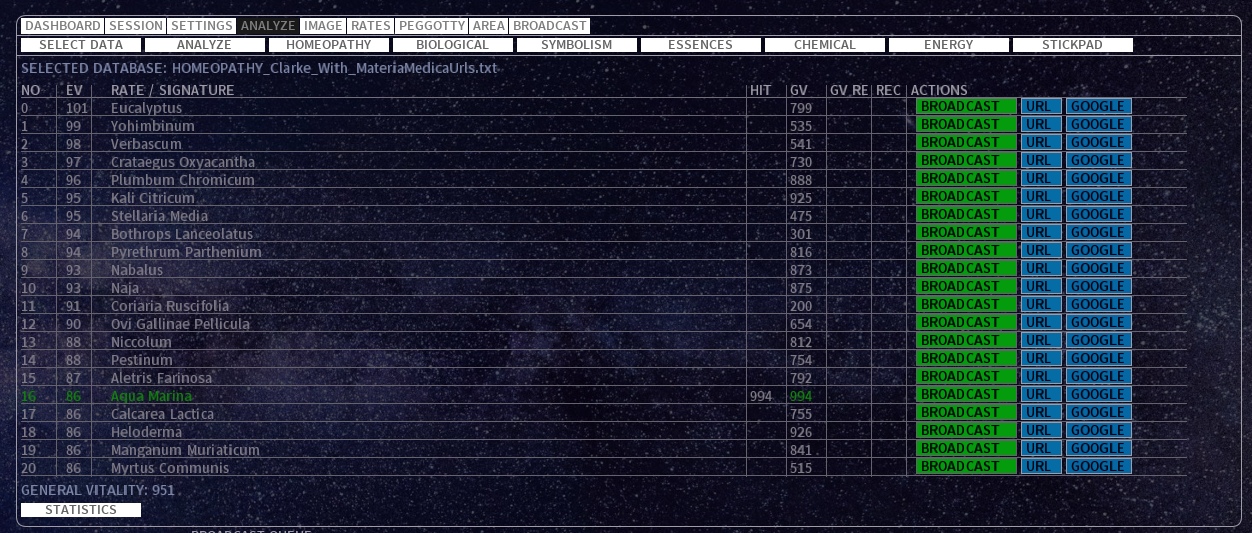
What you need in the Standalone mode is the button STICKPAD. When you click on this button you will see in red colors the coordinates of your mouse. Concentrate on your intention, click on the STICKPAD button and move the mouse, always focusing on your intention to analyze the imbalance or resonance. Do this until you see appearing the result as a table of rates and also a GV (general vitality) check for each entry.
Watch the result table carefully:

“NO” is the number of the entry, 0 to 20 (21 entries).
“EV” is the energetic value achieved during the analysis. The program adds this value to each entry in your rate list by combining informations of time and space, meaning the microseconds with the coordinates of your mouse movement during your use of the virtual STICKPAD. If one of the entries reach a value higher than 100, the analysis stops and continues with the GV check for each entry.
“RATE / SIGNATURE” is the the name of the rate.
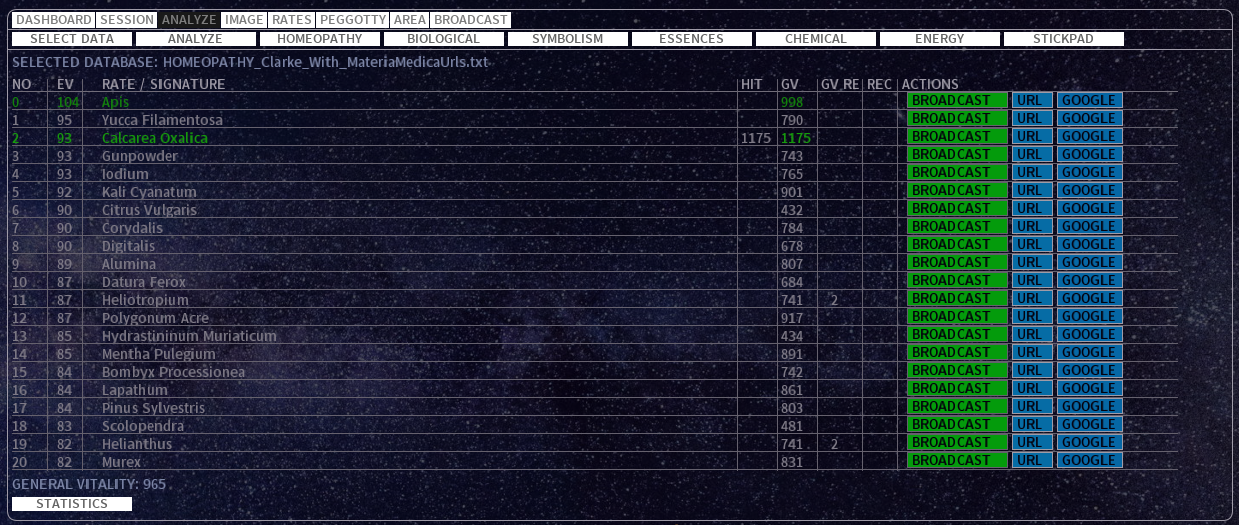
“HIT” is marked when the rate has the highest GV check of all.
“GV” is the general vitality check in relation to the GV of the target, which you find at the bottom left of the table.
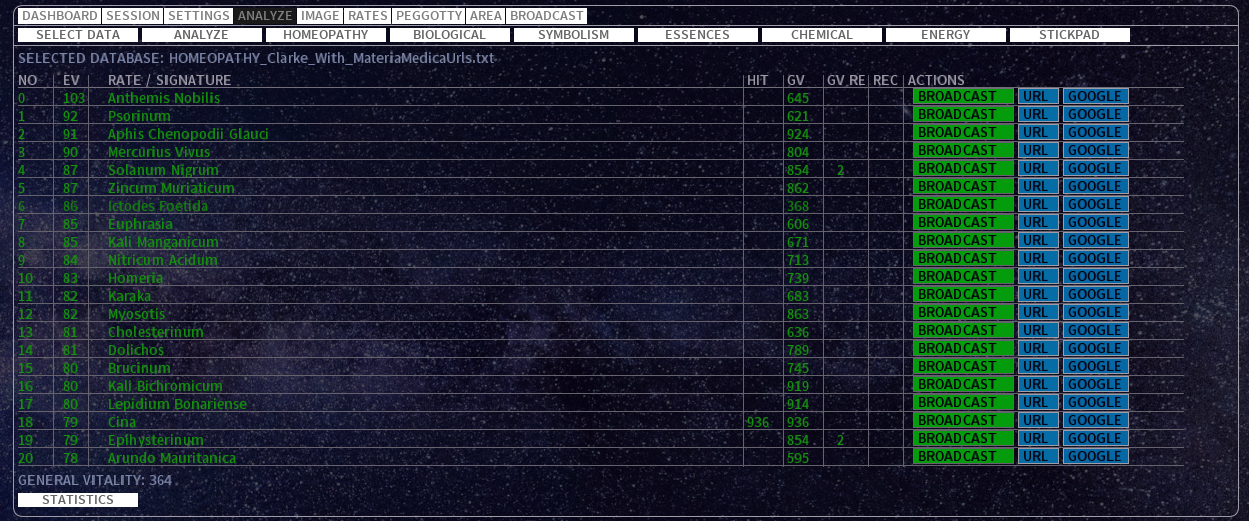
“GV RE” is filled when two or more entries has the same GV. This is a quality indicator of your focus. Usually it is better when no equal GV on different entries occurs. It can happen sometimes, but if you notice too much occurrences, then something is wrong, maybe with your intention, how you move the mouse during the STICKPAD recording process or maybe the software has a bug.

“REC” is the recurrence of the entry during other analysis recorded previously, which happens only if you perform at least two analysis. This is an indicator for a strong morphic resonance and needs more attention.
The action button BROADCAST will broadcast the rate or add it to the queue if there is already one broadcasted. It depends on the SETTING “broadcast.single.rates.only” if you can broadcast 8 at the same time or just one after another. This setting has an immediate effect, so you can change it as you need during one and the same session.
URL button opens a link in your default browser. Not all rates has a URL. The rate list loaded on the start is “HOMEOPATHY_Clarke_With_MateriaMedicaUrls“, my personal favorite, because I love homeopathy and Clarke was a diligent materia medica author, collecting lots of useful informations about even smallest remedies. I have extended this rate list with URLs by separating the name and the url with a tabulator.
Example how to write your own rate list with links, separate the rate name and the url with a tabulator:
Abies Canadensis    http://homeoint.org/clarke/a/ab_c.htm
Abies Nigra    http://homeoint.org/clarke/a/ab_n.htm
Abrotanum  http://homeoint.org/clarke/a/abrot.htm
Abrus precatorius  http://homeoint.org/clarke/j/jeq.htm
Last but not least, the GOOGLE button opens google in your browser and search for the rate name. This is useful for all rates without a url.
At the bottom left in the ANALYSIS screen you see the GV of the target.

The number can easily reach a value of 950, but everything over this value is really strong. Note that a GV is not the health of the amount of life force of your target. It is only a relative value during your analysis regarding the rate entries in the table and your intention you focused during the analysis (with stickpad in standalone mode or with hotbits and Raspberry running). It is an art to interpret this value and maybe it will show a totally different behavior for you than for everyone else. With other words, it will show you what you need to know in order to achieve the desired information. So don’t argue with other operators about what the number should mean, because it is like a personal symbolic language, highly individualized.
The GROUNDING button is for a fast grounding during analysis. It will broadcast a small rate or a series of rates for just a few seconds. Then it measures automatically your GV and if it was improved by the grounding it stops, else it repeats the grounding broadcast until it improves.
STATISTICS is a button which generates a statistic inside the “case” folder as a HTML file. This file can be send via Email to your client or used for a showcase in training radionics (this function needs improvement and is still experimental).
The “Bandwith” is a way to visualize the GV (blue) of the target in relation to all other GVs of the entries, including the HIT as a red line.

The tabs IMAGE, RATES, PEGGOTTY and AREA are still under development and I will document it when they are completed.
BROADCAST
The final tab is specialized in managing broadcasting of the rates. You will see here the visual encoding of the rate. If you change the tab during the broadcasting, the visual encoding continues on a smaller scale on the bottom status footer. Though it is better to leave the tab active during broadcasting. Here and there you will notice a bigger circle running through the entire screen. In my experience this happens whenever a rate was well chosen.

You can also broadcast a rate as number or name directly by typing it in the field SIGNATURE and set in SECONDS how long it should run. Note that you maybe don’t want to overdo a broadcast by broadcasting it for hours. Biological units, including humans, don’t require too much if the rate was perfectly chosen, similar as in homeopathy where you don’t need a too high potency if the remedy was a good match. Click on BROADCAST NOW to initiate the broadcasting of what you have typed in the two fields.
The button BROADCAST LIST is a special function for broadcasting a list or rates and defined duration. The syntax is <RATE-NAME> (<VALUE>[S,M,H]) … well, better take a look at this example:
Agate (5S)
Black Tourmaline (30S)
Hematite (1M)
Jade (20S)
Jet (1M)
Obsidian (5M)
Smoky Quartz (1M)
Bloodstone (10S)
It says, broadcast “Agate” for 5 seconds (5S), then “Black Tourmaline” for 30 seconds (30S), and after that “Hematite” for one minute (1M), … and so on. You can also use H as hour.
WORKFLOW and BEST PRACTICE
The usual workflow is to make an anamnesis, recording all symptoms and feelings, write them down, with date and time annotations. Then check if you feel good enough, perform GROUNDING if necessary, focus on the intention to find the rate which is most resonating with the imbalances and click on STICKPAD. Move the mouse and continue focusing on the desired outcome of getting insight into the imbalances and what resonates best. Try not to focus too much, but don’t lose focus with distractions like your smartphone or TV (radionics is hard work). Then take a look at the results, search in the materia medica for the indications. If one of the rate is not only a HIT in the energetic evaluation, but also in the description, matching the needs of your target, then broadcast it. Wait a little after the broadcast, maybe perform a new GROUNDING, and repeat the ANALYSIS and see what changed.
Please give me feedback how I can improve the documentation, or maybe you have written your own documentation and want to share your link with us!





 Radionics